2026-04-05
Price Alerts Guide
Price Alerts is a service that monitors domain prices across 100+ registrars and sends you an email when a price drops below your limit. You can track registration, renewal and transfer prices for any TLD. Prices are checked every hour, so you get notified quickly when a good deal appears.
Plans
There is a free plan to try the service, plus 3 paid plans with more capacity.
| Plan | Price | Active tasks | Limitations |
|---|---|---|---|
| Free | $0 | 1 | .COM registration only, fixed $10, no filters, task deactivated after each email |
| Basic | $1/mo | 3 | — |
| Standard | $3/mo | 12 | — |
| Plus | $7/mo | 30 | — |
Free Plan Details
- Only 1 active task (one price cell) at a time.
- Only TLD .COM, only registration prices (no renewal or transfer).
- The price is fixed at $10 — you will be notified when .COM registration price is ≤ $10 (paid plans allow any price).
- Notification Filters are not available.
- After each email notification, the task is automatically deactivated — you need to manually reactivate it in your account.
- A good way to try the service before purchasing a paid plan.
Payments are in crypto only. You can top up your balance in your account dashboard.
How to Set Up Alerts
Step 1. Sign in
Go to /account/alerts and enter your email. Click Send magic link. Open your inbox and click the link in the email. No password needed — you sign in with a link every time.
Step 2. Add a TLD
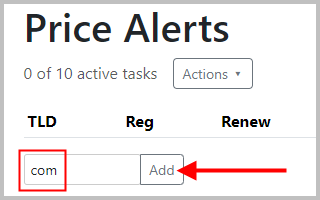
Type a TLD name (for example com) in the input field and click Add.
Step 3. See empty prices
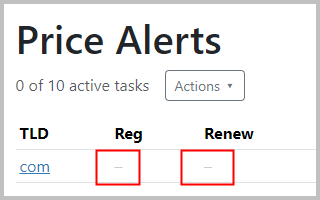
After adding a TLD, you see dashes (–) in the Reg, Renew and Transfer columns. A dash means no price limit is set for that cell.
Step 4. Open the price editor
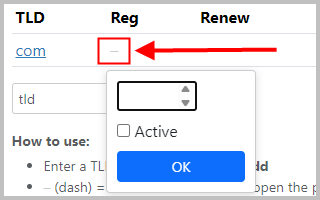
Click any dash to open the price editor. Enter your price limit (in USD, whole numbers), check Active, and click OK.
Step 5. Active and inactive prices
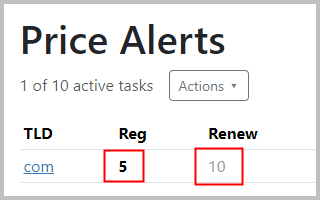
- Bold price = active (alerts are on). In the screenshot, $5 for Reg is active — you get an alert when any registrar price is $5 or less.
- Gray price = inactive (not tracked, does not count toward your task limit). $10 for Renew is inactive — it is stored but ignored until you activate it.
Step 6. Wait for email alerts
Prices are checked once per hour. If any registrar price matches your active alert, you receive an email.
Important: Check your spam folder for the first email and mark it as not spam. Future alerts come from the same address.
Notification Filters
Paid plans can fine-tune which prices trigger alerts. Open the Notification Filters panel on the alerts page.
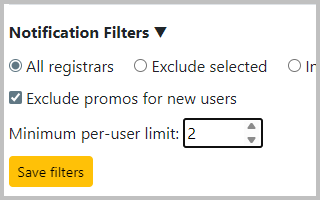
- All registrars — receive alerts from every registrar (default).
- Exclude selected — pick registrars you do NOT want alerts from.
- Include only selected — only get alerts from the registrars you pick.
- Exclude promos for new users — skip promotional prices that are available to new customers only.
- Minimum per-user limit — you will only receive alerts for promos where the per-account domain limit is at least this number. For example, setting this to 2 means you will not be notified about promos limited to 1 domain per account.
Filters are available on paid plans only. Free plan users always get unfiltered alerts.
Tips
- Each active price cell counts as one task. Your plan limits how many active tasks you can have.
- To pause an alert without deleting it, uncheck Active in the price editor. The price turns gray and stays saved.
- See Notification Filters above to control which registrars and promos trigger alerts.
- Changes save automatically — there is no Save button.